Booking: Salesforce Booking Calendar and Resource Scheduler
Book rooms, equipment, vehicles and people on your own Salesforce objects. Open slots, live capacity and double-booking checks, all on one screen.
Or book a slot in the live demo now, no login →- Passed Salesforce Security Review
- 100% native: your data stays in Salesforce
- Any object, incl. User
- Live capacity
- No double booking
- Multi-resource
- Five views
- Screen Flows
- Experience Cloud
- No Apex
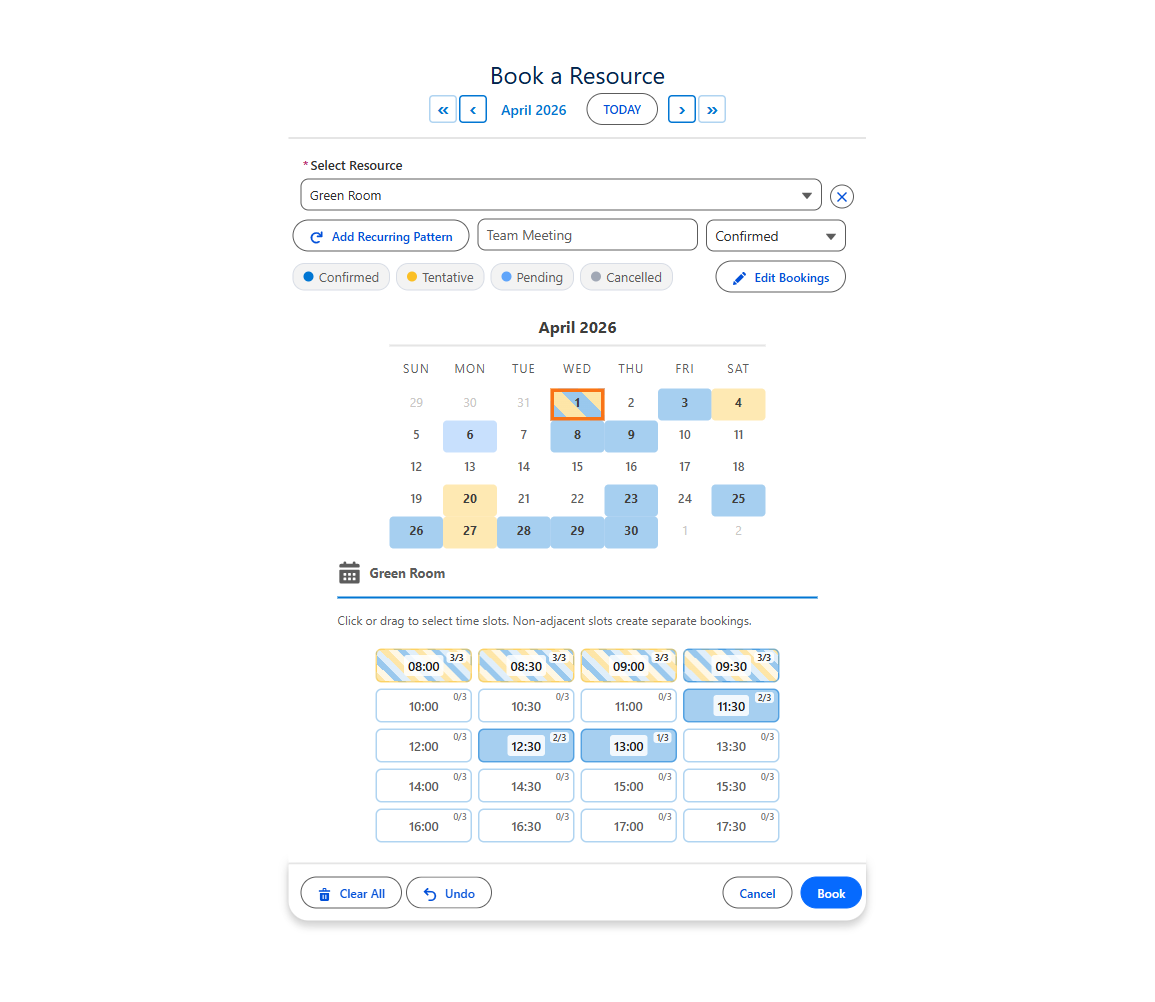
The live demo is this Booking component
A fictional ACME Financial advisor booking on a public Salesforce site. Book a slot with live “2 of 3 available” capacity, then see the back office. Resets every hour.
A Salesforce booking system in four clicks
Booking adds resources, time slots and capacity to the MultiDatePick calendar. Every booking saves as a record on your own object.
- 1Pick a resource
- 2Pick one or many dates
- 3Click open time slots
- 4Book: records saved
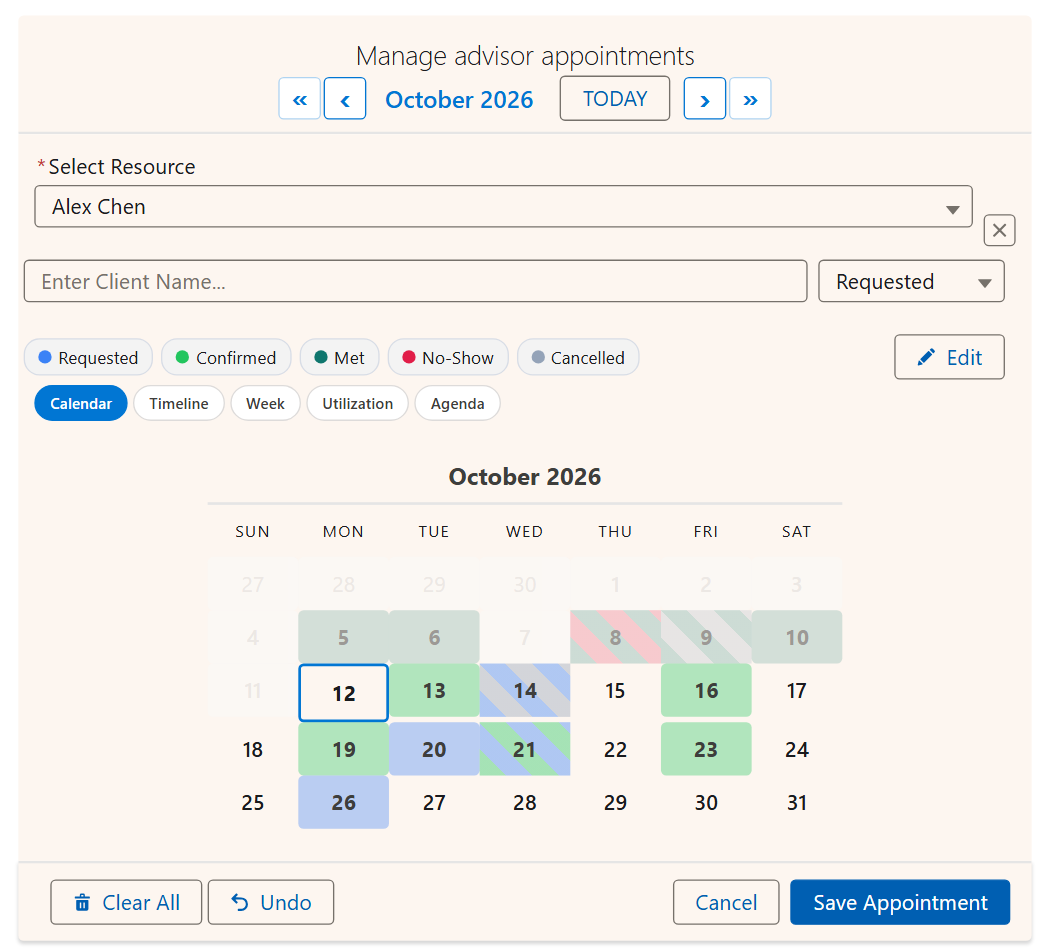
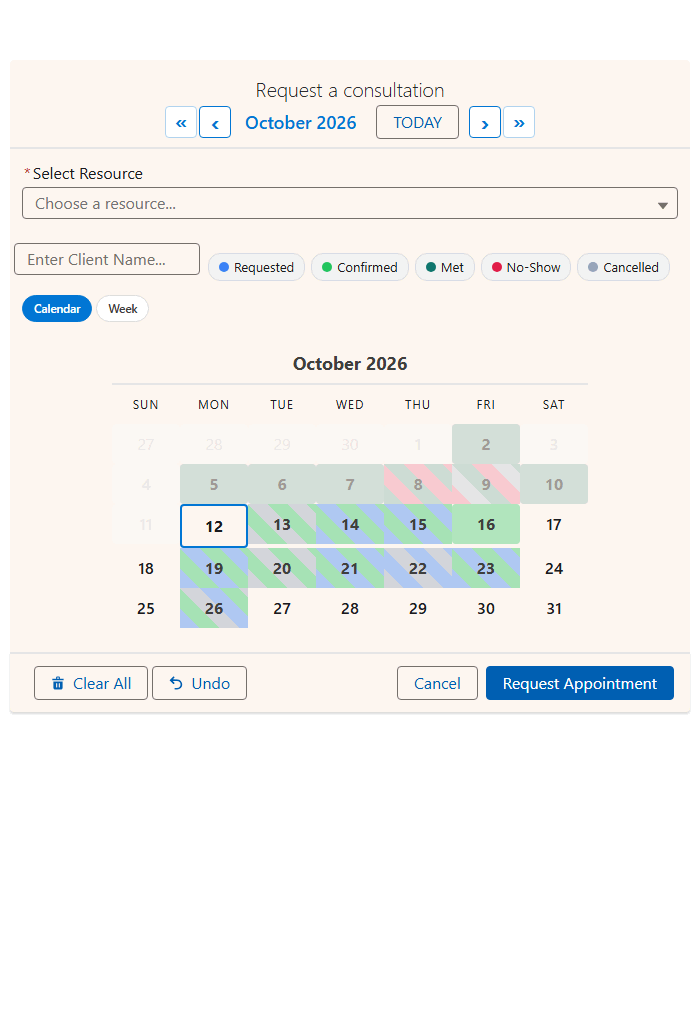
Salesforce resource calendar: five views of the same bookings
Booking is the component where every view earns its keep, because it knows resources and capacity. Same records, same save path. Only the layout changes.
| View | What you see | Answers |
|---|---|---|
| Calendar | A month for the chosen resource, days colored by status | What is on the 14th? |
| Timeline | Resources down, dates across, multi-day bookings as one bar. Day, Week or Month zoom | Which room is free, and when? |
| Week | Seven days by business hours, bookings sized to their length | Who is free Thursday at 2pm? |
| Utilization | Booked of capacity per resource per day, as a heatmap | Who is over capacity? |
| Agenda | The next 60 days in date order, with time and status | What is next? |
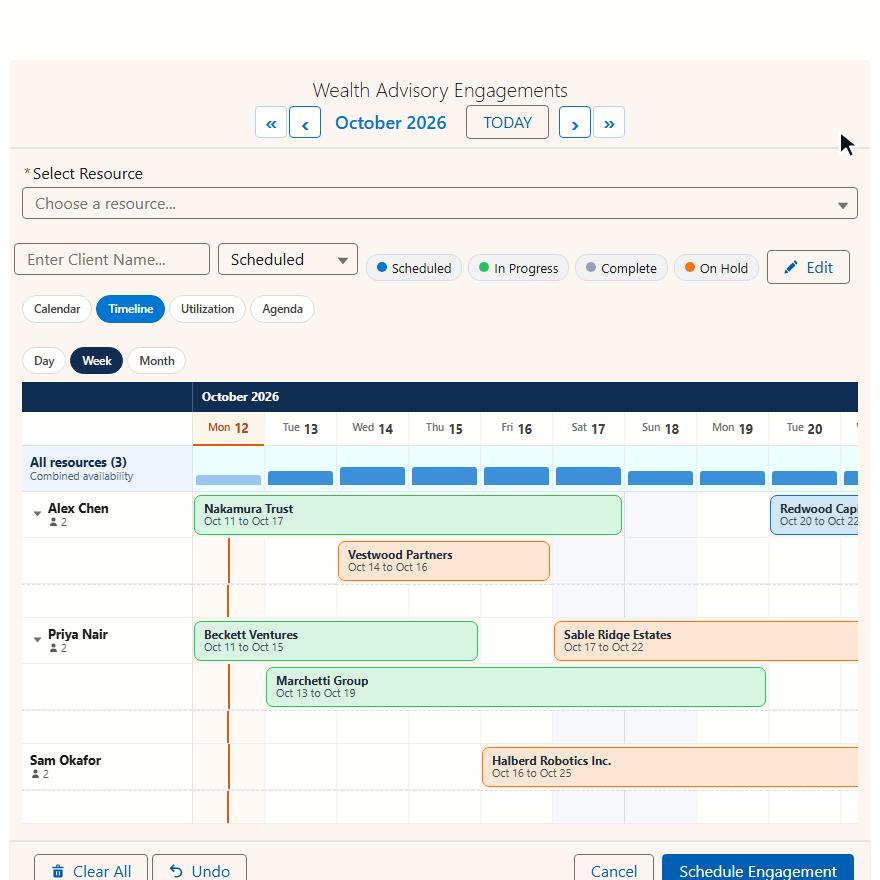
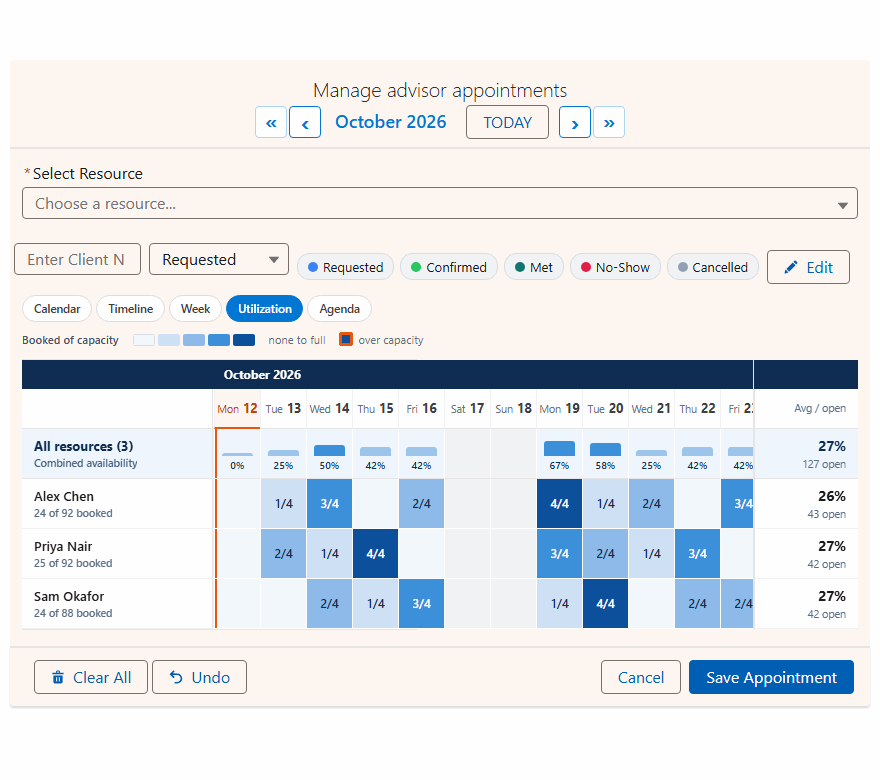
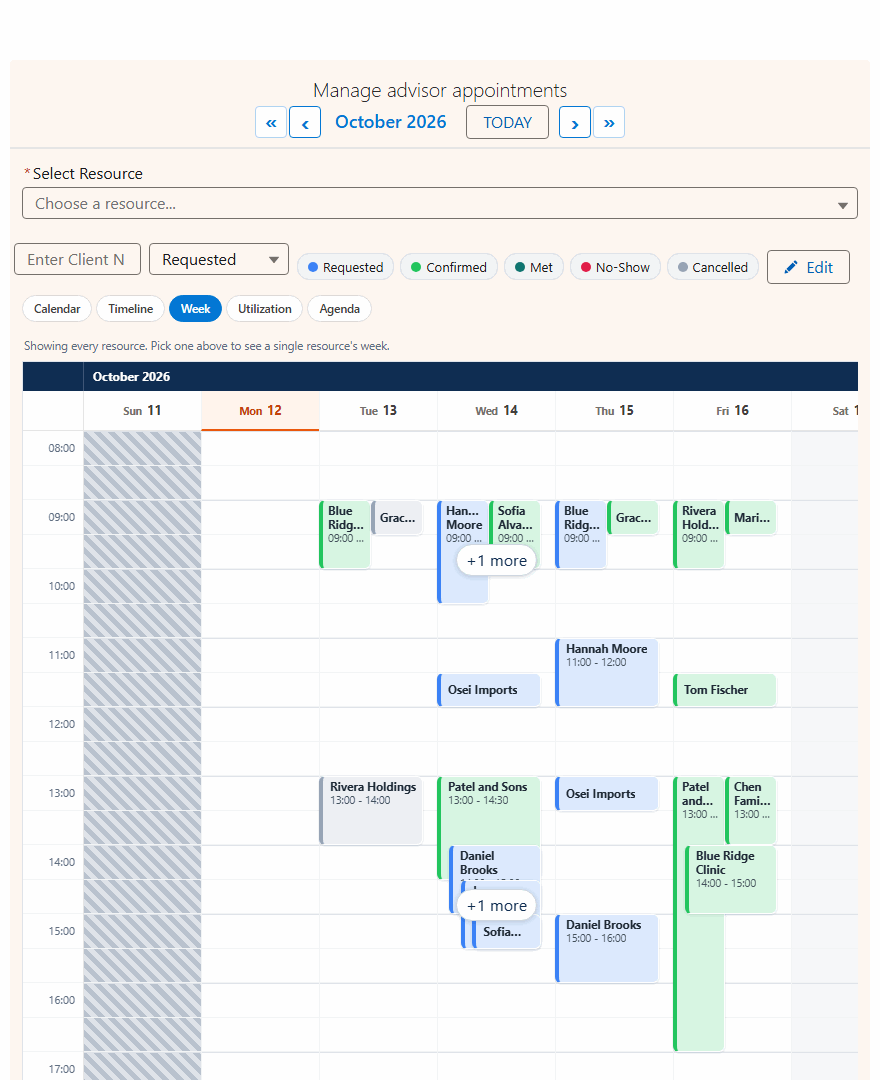
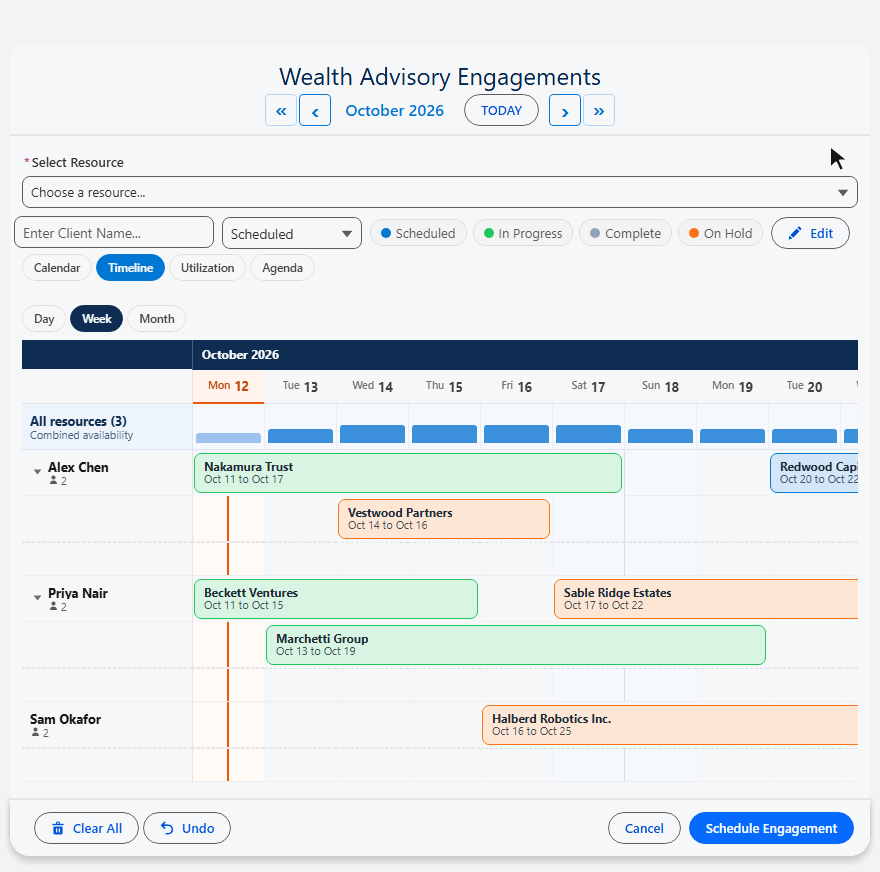
Point the resource at User and it schedules people
Timeline becomes a roster, Week a shift grid, Utilization a team capacity dashboard. The Config Library ships Team Capacity Planning and Staff Shift Roster ready to import.
Deep dives: the Salesforce timeline view and the Salesforce utilization heatmap.
Capacity and conflict detection: no double booking
Every save is checked against existing bookings. You choose what happens on a clash.
| Setting | What it does |
|---|---|
| Capacity Field | A number on the resource. Slots stay bookable until full, with live 3/10 badges |
| Capacity Aggregation | Combined sums several resources (4 rooms of 5 = 20 seats). Distinct counts one event across rooms once; pair it with Block so the event saves only when every room is free |
| Hide Bookings With Status | Cancelled bookings vanish from the grid and free their capacity |
| Conflict Look-Ahead Days | How far ahead badges and conflicts are checked. Default 360 |
Use cases: room, equipment and people booking in Salesforce
Anything shared that gets reserved by date and time. Fifteen real setups, with the settings that make each one work.
Conference room booking
Each room shows its own hours. Compare rooms side by side.
- Business hours
- Multiple resources
Training enrollment
Seats per session, with Enrolled, Waitlisted and Cancelled colors.
- Capacity
- 3/10 badges
Desk hoteling
Hybrid staff reserve desks weeks ahead and change them later.
- Two-month view
- Edit mode
Vehicle and fleet reservation
Compare the whole fleet. Hover shows make, model and plate.
- Multiple resources
- Hover fields
Therapist and counselor sessions
One-hour blocks inside each therapist's own hours.
- 60 minute slots
- Status colors
Classroom allocation
Room capacity per slot, or full-day bookings with no times.
- Capacity
- Full-day mode
Coworking spaces
Pods share seats; cancellations free capacity at once.
- Capacity
- Hide cancelled
Hotel and property stays
Pick nights and a room. A stay saves as one check-in to check-out record.
- Full-day mode
- End Date Field
Field service technicians
Dispatch across 25+ techs, never two jobs on one tech.
- Block conflicts
- Active filter
Service truck dispatch
Filter trucks by type and region; cap stops per slot.
- Two-field filter
- Capacity
Event venue spaces
Multi-day setup and tear-down as one record, color-coded by hold.
- End Date Field
- Status colors
Studio and gear booking
Clients see availability on a public page before requesting.
- Read-only preload
- Experience Cloud
Sports fields and courts
Book several courts for a tournament, inside the open season.
- Multiple resources
- Latest date
Medical appointments
Patients pick a doctor by specialty and a 15 minute slot.
- Specialty filter
- 15 minute slots
EV charging bays
Each bay is a resource; hover shows charger speed.
- Combined or Distinct
- Hover fields
Rooms in depth: Salesforce conference room booking.
Self-service booking on Experience Cloud
The same component on a public site page. Customers book open slots themselves, straight into your org.
- Open slots and live capacity
- An in-component confirmation toast
- One status set for them, picker hidden
- Config Name, plus Static Parent Record Id
- Show In-Component Toast on
- Selectable Statuses, e.g. Requested
- Guest access to your booking and resource objects
Guests can read and create. That is a Salesforce guest-user rule, so cancel and edit flows belong behind a login. Booking is exactly what guests can do.
Full walkthrough: Salesforce Experience Cloud booking. Weighing Salesforce Scheduler? Compare it with MultiDatePick.
How bookings save: your objects, your fields
No new data model. Point the Setup Wizard at two objects you already have, plus an optional closures table.
- Booking Object API Name
Room_Booking__c - Booking Date Field
Booking_Date__c - Booking Start / End Time Field
Start_Time__c - Booking Resource Field
Meeting_Room__c - Parent Record Relationship Field
Contact__c - End Date Field (optional)
End_Date__c - Status Field (optional)
Status__c
- Resource Object API Name
Meeting_Room__c - Resource Name Field
Name - Business Hours Start / End Field
Business_Hours_Start__c - Capacity Field (optional)
Capacity__c - Resource Filter Field (optional)
Active__c
- Blocked Dates Object
Closure__c - Blocked Dates Date Field
Date__c - Start / End Time Fieldpart-day closure
- Blocked Dates Resource Fieldone resource only
Filter the resource picker by any field
Resource Filter Field and Value scope the list. A comma means OR, a semicolon combines fields with AND. The wizard shows the right control for the field type.
| Show only | Filter Field | Filter Value |
|---|---|---|
| Active resources Checkbox | Active__c | true |
| North or South building Picklist | Building__c | North,South |
| Rooms seating 12 or 16 Number | Capacity__c | 12,16 |
| Conference rooms in North or South Two fields, AND | Type__c;Building__c | Conference Room;North,South |
Also supported: Text, Long Text and Lookup fields (paste record Ids).
Add the booking calendar to a page or a Screen Flow
Build the config once in the Setup Wizard, then drop the component anywhere. No Apex.
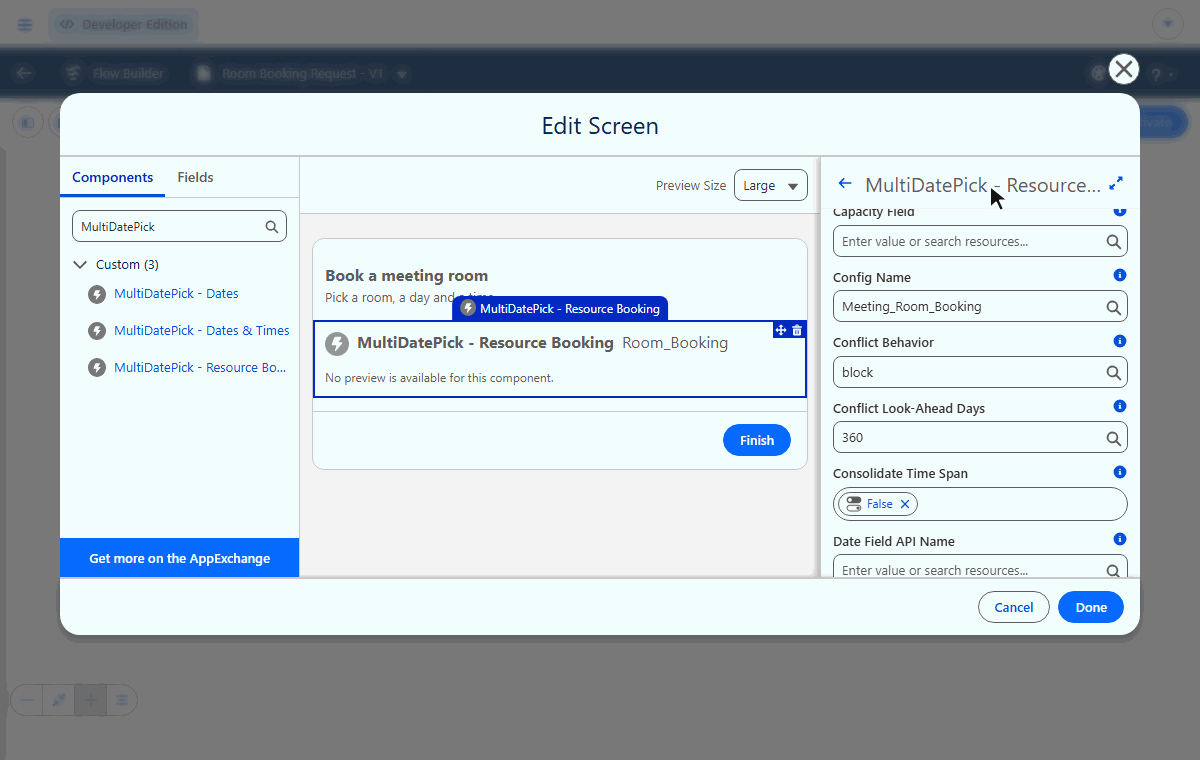
- Drag MultiDatePick - Resource Booking onto the page
- Set Config Name
- Record pages link bookings to the record automatically
- App, Home and Experience pages: set Static Parent Record Id
- Drag the component onto a Flow screen
- Set Config Name; every checkbox comes from the config
- Records save on Book, no Loop or Create Records
- Outputs: bookings saved, and dates that conflicted
| After Book | You get |
|---|---|
| Records | Saved on Book. Adjacent slots join into one booking; with End Date Field, adjacent dates do too |
| Successful Bookings Count | Flow output: how many saved |
| Conflict Dates | Flow output: dates that could not be booked |
| Done button | Collapses to a summary card on the page |
Step by step: Getting Started and the Flow Cheat Sheet.
Specifications and pricing
At a glance, for evaluators and architects.
| Security | Passed Salesforce AppExchange Security Review |
| Data | 100% native: your data stays in Salesforce. No external servers, no callouts. |
| Editions | Enterprise, Unlimited, Performance, Developer and Salesforce Platform, plus industry clouds. Not Essentials or Professional. |
| Where it runs | Screen Flow, Record, App and Home pages, Experience Cloud |
| Time slots | Any interval (15, 30 or 60 minutes are typical), or full-day |
| Languages | 9, including Spanish, French, German and Japanese |
| Accessibility | WCAG 2.1 AA |
| Settings | 100+, set in the Setup Wizard or App Builder |
| Data | 100% native: your data stays in Salesforce, on your own objects |
- Booking, Date and Date Time, every feature
- 30-day free trial, no card required
- No per-booking meter
Salesforce booking calendar questions
Short answers to what people search.
Does Salesforce have a booking calendar?
Not one that books your own objects. The standard Salesforce calendar shows Events and records, but it is a viewer, not a booking control. Salesforce Scheduler is a paid add-on built on its own data model. MultiDatePick Booking adds a booking calendar to any object, with time slots, capacity and conflict checks.
How do I book rooms or equipment in Salesforce?
Keep your rooms or equipment as records on any object, then point the MultiDatePick Booking component at that object in the Setup Wizard. Users pick a room, pick dates, click open time slots and book. Each booking saves as a record on your booking object, linked to the room and the parent record.
Can customers book on an Experience Cloud site?
Yes. Drop the Booking component on an Experience Cloud page, set Config Name and Static Parent Record Id, and visitors book open slots themselves. Guest users can read and create, so cancellations and edits belong behind a login.
How do I prevent double booking in Salesforce?
Set Conflict Behavior on the Booking component. Block makes taken slots unclickable, Skip saves the open dates of a multi-date booking and names the ones it skipped, and Allow permits overlap. With a Capacity Field, a slot stays open until it is full, shown as live badges like 3/10.
Can I see a calendar for every room or resource in Salesforce?
Yes. The Timeline view puts every room, vehicle or person down the side and dates across the top, with a combined capacity strip. The Utilization view shows how full each resource is per day as a heatmap, and the Week view shows open hours.
Can one booking reserve several resources at once?
Yes. Turn on Allow Booking Multiple Resources and users tick several rooms, people or vehicles. Capacity Aggregation decides how availability adds up: Combined for independent inventory, Distinct for one event that needs every resource free.
Is there a Lightning Web Component for booking in Salesforce?
Yes. MultiDatePick Booking is a Lightning Web Component for Screen Flows, Record Pages, App Pages, Home Pages and Experience Cloud pages. It is configured in a Setup Wizard, with no Apex.
How much does the MultiDatePick booking calendar cost?
$20 per user per month for every component and feature, with a 30-day free trial and no card required.
Every Booking setting
The full reference, by the label admins see in App Builder, Flow Builder and the Setup Wizard.
Open the full Booking settings reference
With Config Name set, every setting comes from the Setup Wizard config. The Date and Date Time pages document the shared calendar settings too: Date reference.
Configuration and views
| Setting | API name | Default | What it does |
|---|---|---|---|
| Config Name | configName | Loads every setting from a saved Setup Wizard config | |
| View | view | calendar | Opening layout: calendar, timeline, week, utilization or agenda. Utilization and agenda are read only |
| Available Views | availableViews | all five | Which views the switcher offers. The default view is always included |
| Timeline Window (Days) | timelineWindowDays | 14 | Days the timeline shows at once. 0 for the full month |
| Timeline Zoom | timelineZoom | week | Starting zoom: day, week or month. Users can switch |
| Timeline Group By Field | timelineGroupByField | Groups timeline rows under headers, e.g. by building, each with a capacity strip | |
| Max View Resources | maxViewResources | Most resource rows Timeline and Utilization draw, busiest first. Limits rows drawn, not rows counted | |
| Resource Rows | resourceViewFilter | all | all, or booked to draw only resources with a booking in the window |
| Agenda Fields | agendaFields | Extra fields on each agenda row. Blank reuses Hover Popover Fields |
Display
| Setting | API name | Default | What it does |
|---|---|---|---|
| Button Label | label | Book Resource | Text on the button that opens the calendar |
| Calendar Title | modalTitle | Book Resource | Title at the top of the calendar |
| Show Inline (No Button) | showInline | false | Calendar always visible on the page, no popup |
| Show Done Button in Inline Mode | showDoneButtonInline | true | Done collapses the inline calendar to a summary card; click to reopen |
| Two-Month View | twoMonthView | false | Two months side by side |
| Calendar Size | calendarSize | medium | small, medium or large |
| Day Header Format | dayHeaderFormat | 3 | 3 = SUN MON, 2 = SU MO, 1 = S M |
| Week Starts on Monday | weekStartsOnMonday | false | Week begins Monday instead of Sunday |
| Show Recurring Pattern Button | showRecurringPattern | true | Weekly and monthly patterns for picking many dates |
| Show Selection Summary | showSelectedSummary | true | Count and ranges of the selected dates |
| Required | required | false | A Flow cannot advance until something is picked |
Resource
| Setting | API name | Default | What it does |
|---|---|---|---|
| Resource Object API Name | resourceObjectApiName | The object that holds what gets booked. Any object, including User | |
| Resource Name Field | resourceNameField | Name | Name shown in the resource picker |
| Business Hours Start Field | businessHoursStartField | Time field: when each resource opens | |
| Business Hours End Field | businessHoursEndField | Time field: when each resource closes | |
| Capacity Field | capacityField | Bookings allowed per slot. Turns on capacity mode and Utilization percentages | |
| Show Availability Count | showAvailabilityCount | true | Live 3/10 badges on slots, with a Capacity Field |
| Allow Booking Multiple Resources | allowMultipleResources | false | Tick several resources and book them together |
| Capacity Aggregation (multi-resource) | capacityAggregation | Combined | Combined sums bookings and capacities. Distinct counts one event across resources once |
| Allow Save Without Picking a Resource | allowNoResource | false | Saves with a blank resource, e.g. a closure that applies to everyone |
| Resource Filter Field (optional) | resourceFilterField | Field(s) that limit the picker. Use ; to combine fields | |
| Resource Filter Value (optional) | resourceFilterValue | Value(s) to match. , means OR, ; means AND across fields |
Booking record
| Setting | API name | Default | What it does |
|---|---|---|---|
| Booking Object API Name | resourceBookingObject | Where booking records are created | |
| Booking Date Field | bookingDateField | Date field on the booking | |
| Booking Start Time Field | bookingStartTimeField | Time field for the start | |
| Booking End Time Field | bookingEndTimeField | Time field for the end | |
| Booking Resource Field | bookingResourceField | Lookup to the booked resource | |
| Parent Record Relationship Field | relationshipFieldApiName | Lookup from each booking to the parent record | |
| End Date Field | endDateField | Adjacent dates save as one record with a start and end date (Mon to Fri rental = 1 record) | |
| Book Button Label | resourceBookButtonLabel | Book | e.g. Reserve or Schedule |
| Record Name Field | recordNameField | Text field for a readable record name | |
| Default Record Name | defaultRecordName | e.g. Room Booking | |
| Append Date/Time to Record Name | appendDateTimeToName | true | Adds the date and time to the name |
Time slots
| Setting | API name | Default | What it does |
|---|---|---|---|
| Time Slot Interval (Minutes) | timeInterval | 30 | Slot length, any number of minutes |
| Disable Time Slot Grid (Full-Day Mode) | disableTimeSlotGrid | false | Date-only bookings, e.g. hotel nights |
| Allow Different Times Per Date | allowDifferentTimes | false | Each date gets its own slot grid |
| Group Time Slots by Period | groupTimeSlotsByPeriod | false | Morning, Afternoon and Evening groups |
| Max Time Slots | maxTimeSlotSelection | 0 | Most slots one user can pick in total. 0 = unlimited |
| Allow Whole-Day (No Times) | allowWholeDayNoTimes | false | A date picked with no slots saves as a whole-day record |
| Time Grid Only | timeGridOnly | false | Hides the calendar; shows only the slot grid for one implied date |
| Time Grid Date | timeGridDate | Explicit date (YYYY-MM-DD) for Time Grid Only | |
| Time Grid Date Field | timeGridDateField | Date field on the host record. Priority: Time Grid Date, then this field, then today |
Conflicts and capacity
| Setting | API name | Default | What it does |
|---|---|---|---|
| Conflict Behavior | conflictBehavior | block | block: taken slots cannot be picked. skip: multi-date bookings save the open dates and list the skipped ones. allow: no check |
| Conflict Look-Ahead Days | conflictLookAheadDays | 360 | Window for both availability badges and the conflict check on save |
| Hide Bookings With Status | hideBookingsWithStatus | e.g. Cancelled: hidden from the grid and left out of capacity |
Status and hover
| Setting | API name | Default | What it does |
|---|---|---|---|
| Status Field | statusField | Picklist that drives the colors | |
| Status Colors | statusColors | e.g. Confirmed:green,Pending:orange,Cancelled:red | |
| Status Color Display | statusColorDisplay | both | grid (slots), calendar (days) or both |
| Status Field Label | statusFieldLabel | Label for the status picker | |
| Selectable Statuses (Status Picker) | selectableStatuses | Which statuses users may set. One value is applied automatically and the picker hides | |
| Second Picklist Field | secondStatusField | A second picklist chosen on save, e.g. a reason. Not color-coded | |
| Second Picklist Label | secondStatusFieldLabel | Label for the second picklist | |
| Selectable Second-Picklist Values | selectableSecondStatuses | Allowed values for the second picklist | |
| Hover Popover Fields | hoverFields | Fields shown when hovering a booking | |
| Show In-Component Toast | showSuccessToast | false | Confirmation drawn inside the component. Needed on Experience Cloud |
| Success Toast Message (optional) | successToastMessage | Custom success text |
Edit mode
| Setting | API name | Default | What it does |
|---|---|---|---|
| Enable Edit Mode | enableEditMode | true | Bulk change status, date, time or resource in one Apply, with the same conflict check. Deletes need two clicks |
| Edit Button Label | editButtonLabel | Edit Bookings | Label for the edit button |
| Edit Record Display | editRecordDisplay | name, status, time, resource | Which details show per record in the edit list, in order. Keywords: name, status, time, date, resource |
Dates and limits
| Setting | API name | Default | What it does |
|---|---|---|---|
| Max Dates Per Booking | maxSelections | 0 | Most dates per booking. 0 = unlimited |
| Allow Past Dates | allowPastDates | false | Allow booking in the past |
| Earliest Bookable Date | minDate | Nothing before this date | |
| Latest Bookable Date | maxDate | Nothing after this date | |
| Pre-Selected Dates | defaultDates | Dates picked when the calendar opens | |
| Blocked Dates | disabledDates | A fixed list of dates that cannot be picked | |
| Only These Dates Are Selectable | availableDates | Everything else is closed | |
| Auto-Jump to First Available Date | autoJumpToFirstAvailable | false | Opens on the first open month |
Blocked dates object
| Setting | API name | Default | What it does |
|---|---|---|---|
| Blocked Dates Object | blockedDatesSourceObject | Object of holidays and closures. Turns blocking on | |
| Blocked Dates Date Field | blockedDatesDateField | Date field on that object | |
| Blocked Dates Filter Field | blockedDatesFilterField | Field that picks which closures apply | |
| Blocked Dates Filter Value | blockedDatesFilterValue | Value that field must equal | |
| Blocked Dates Start Time Field | blockedDatesStartTimeField | Start of a part-day closure | |
| Blocked Dates End Time Field | blockedDatesEndTimeField | End of a part-day closure | |
| Blocked Dates Resource Field | blockedDatesResourceField | Closes one resource only. Blank closes all |
Saving to the parent record
| Setting | API name | Default | What it does |
|---|---|---|---|
| Static Parent Record Id | staticRecordId | Parent record for App, Home and Experience pages | |
| Parent Record Id | recordId | Set automatically on record pages; pass it in a Flow | |
| Parent Record Id Field | parentRecordIdField | Alternative parent linking field | |
| Related Booking Object API Name | relatedObjectApiName | Usually the same as Booking Object API Name | |
| Date Field API Name | dateFieldApiName | Usually the same as Booking Date Field | |
| Load Existing Dates | preloadExistingDates | true | Shows existing bookings on the grid |
| Existing Dates Mode | preloadMode | editable | editable, or readonly for public availability pages |
| Save Button Label | saveButtonLabel | Save | Text on the save button |
Sub-blocks (Consolidate Time Span)
All picked slots become one parent booking from first to last slot; gaps save as child records. For trainer days, travel time or shift breaks, not for rooms that should free up between meetings.
| Setting | API name | Default | What it does |
|---|---|---|---|
| Consolidate Time Span | consolidateTimeSpan | false | Turns sub-blocks on |
| Sub-Block Object API Name | subBlockObjectApiName | Child object for the gaps | |
| Sub-Block Parent Lookup Field | subBlockParentLookupField | Lookup back to the parent booking | |
| Sub-Block Date Field | subBlockDateField | Date field on the child | |
| Sub-Block Start Time Field | subBlockStartTimeField | Start time on the child | |
| Sub-Block End Time Field | subBlockEndTimeField | End time on the child | |
| Sub-Block Name Field | subBlockNameField | Filled with the Sub-Block Button Label | |
| Sub-Block Button Label | subBlockModeButtonLabel | e.g. Mark as Break | |
| Show Sub-Block Toggle Button | showSubBlockButton | false | Shows that toggle on the grid |
Flow outputs
| Setting | API name | Type | What it returns |
|---|---|---|---|
| Successful Bookings Count (Output) | bookingSuccessCount | Number | How many bookings saved |
| Conflict Dates (Output) | bookingConflictDates | Text collection | Dates that could not be booked |
Book rooms, equipment and people in Salesforce
Coming soon to the Salesforce AppExchange. Book a slot in the live demo now, or tell us where to send the launch note.
$20/user/month, 30-day free trial, no card required. 100% Salesforce native.