
Date Time: Salesforce Date and Time Slot Picker
Pick many dates, drag the hours, and save every time block to your own Salesforce records. A calendar time slot picker for appointments, shifts and interviews, set up in a wizard.
Or try the live demo now, no login →- Passed Salesforce Security Review
- 100% native: your data stays in Salesforce
- Time slot grid
- Per-date times
- No double-booking
- Status colors
- Screen Flows
- Experience Cloud
- No Apex
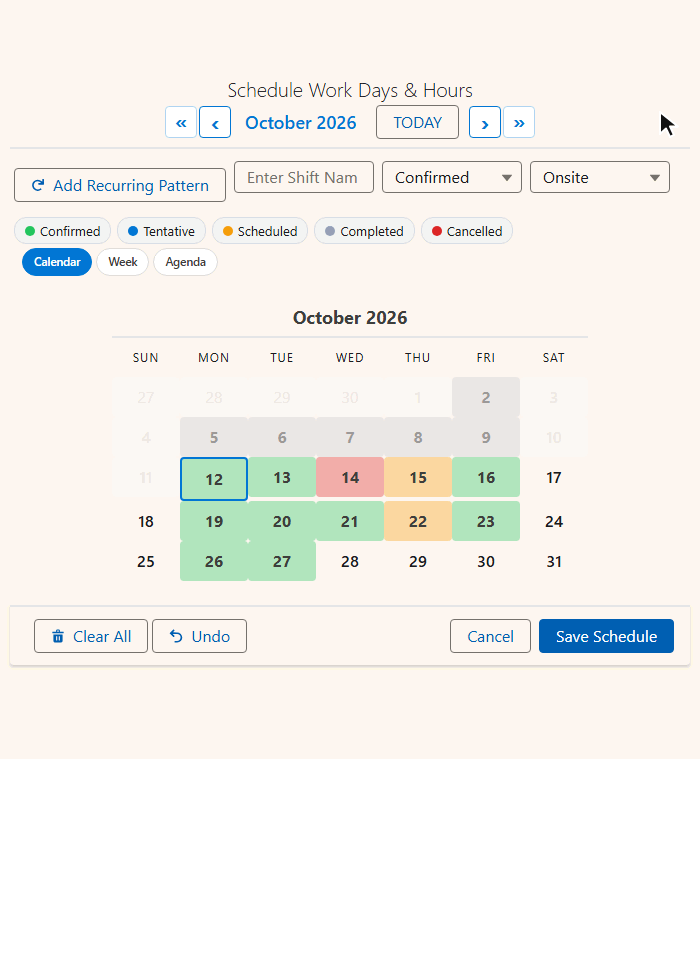
Salesforce has a date field and a time field. Not a time slot picker.
Date Time turns "these four days, 9 to 12" into four records in one save.
| What you need | Standard Salesforce | With Date Time |
|---|---|---|
| Many dates, one schedule | ✗One record at a time | ✓Click, drag or add a recurring pattern |
| Pick a time visually | ✗Type into a time field | ✓Drag across a time slot grid |
| Different hours per day | ✗Edit each record | ✓A grid for every date |
| No double-booking | ✗Validation rules or Apex | ✓Taken slots greyed out |
| See status at a glance | ✗Open each record | ✓Colors on dates and slots |
| Set it up | ✗A developer and a custom LWC | ✓Point-and-click Setup Wizard |
Why it is harder than it looks: building a calendar time slot picker in Salesforce.
The calendar time slot picker
Dates on top, times underneath. Click or drag slots; each run of adjacent slots saves as one booking.
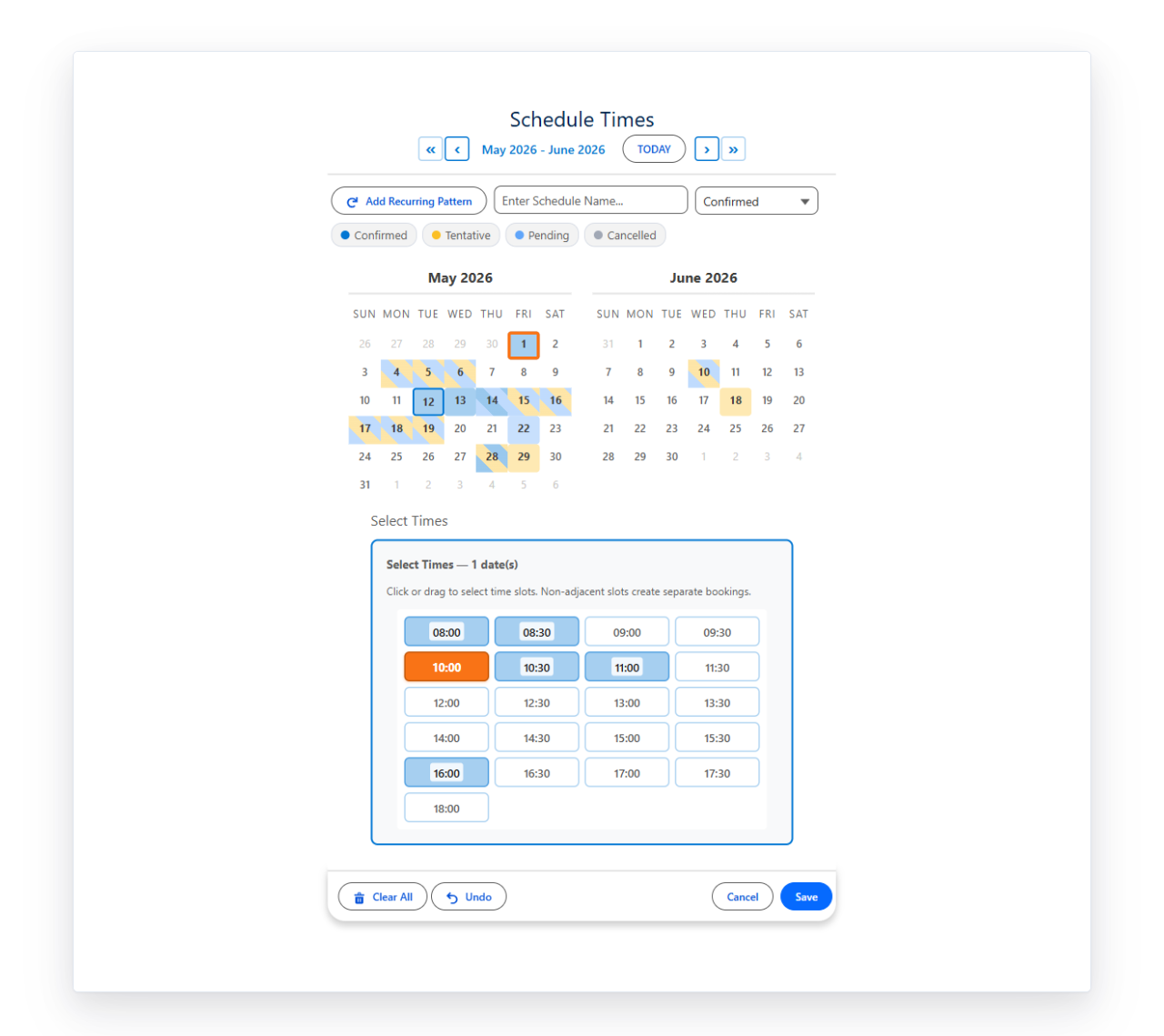
- Pick dates
- Drag times
- Set status
- Save
Grid or dropdown
Shared or per-date times
Size the day
- Time Interval: any interval (15, 30 or 60 minutes are typical)
- Earliest / Latest Time: 08:00 to 18:00 by default
- Enable End Time: capture a start and an end
Built for real appointment and shift scheduling
Every one of these is a setting, not a customization.
- Hover details
- Second picklist
- Two-month view
- Blocked dates
- Auto-named records
- In-component toast
- 9 languages
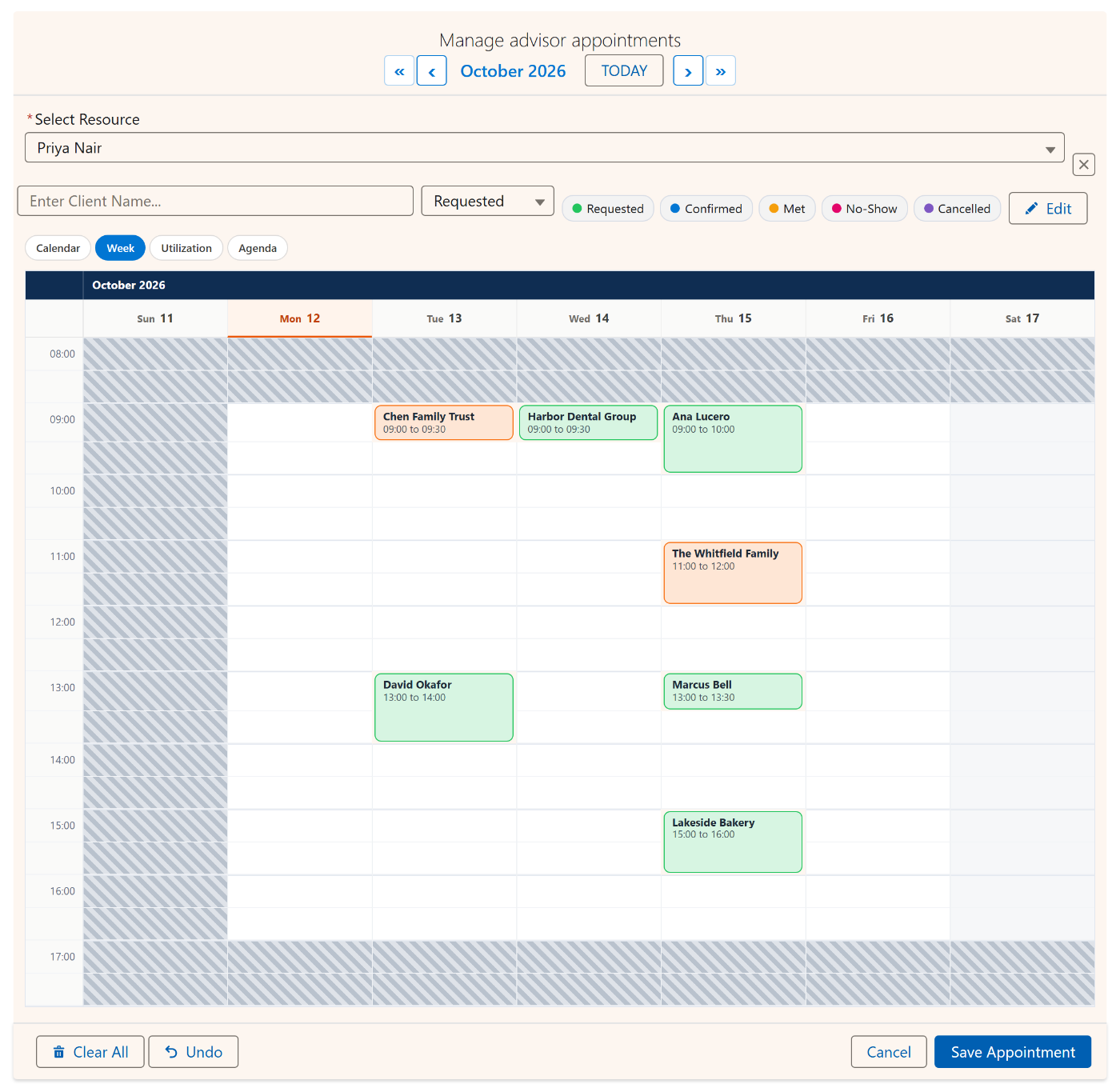
Week view: see every time, not just every date
Bookings drawn as tall as they last. Same records and same save; only the layout changes.
| View | Best for |
|---|---|
| Week | Interviews, appointments, office hours. Drag across days and down hours at once. |
| Calendar | Pick the day first, the time second. The default. |
| Agenda | The next 60 days as a list with start and end times. |
| Timeline | Dates across, records down. Multi-day blocks as bars. |
| Utilization | Capacity heatmap. Pair with Booking. |
Two settings. View picks the opening layout; Available Views sets the switcher, e.g. calendar,week,agenda. Earliest and Latest Time bound the week grid too.
Use cases for a Salesforce time slot scheduler
Fifteen ways teams use Date Time, and the settings that make each one work.
Interview scheduling
Different slots on different days, colored by outcome.
- 30-min slots
- Per-date times
- Status colors
Appointment booking
Business hours only, no overlaps.
- Block conflicts
- 08:00 to 17:00
- Start and end
Shift scheduling
One shift record per day, from one drag.
- 60-min slots
- Periods
- End time
Maintenance windows
02:00, 03:00, 04:00 becomes one 02:00 to 05:00 window.
- Consolidate span
- Block conflicts
Delivery windows
A clean time picker for each delivery date.
- Dropdown
- Per-date times
Clinic appointments
Fine-grained slots with booked ones colored.
- 15-min slots
- Load existing
- Status on grid
Callback scheduling
Reps book customer callbacks without collisions.
- 30-min slots
- Block conflicts
- Auto-named
Customer onboarding
Eight weekly sessions set in two clicks.
- Recurring pattern
- Auto-named
Training classes
Morning and afternoon blocks, lunch saved as a break.
- Per-date times
- Sub-blocks
Demo requests
Prospects pick a slot on your site; taken ones are greyed.
- Experience Cloud
- Read-only existing
QBR scheduling
90-minute reviews across a quarter end.
- Two-month view
- Status colors
Property showings
Open, booked and held tour slots by color.
- Time grid
- Status on grid
Dispatch windows
Field jobs slotted into time windows per day.
- Hourly slots
- End time
Webinar registration
One registration record per session picked.
- Dropdown
- Allow overlaps
Conference sessions
Each day's keynote and breakouts as one record with detail.
- Sub-blocks
- Periods
Deeper dives: Salesforce interview scheduling and staffing and shift scheduling.
How records save: your object, your fields
A child object with a Date, a Time or two, and a lookup to the parent. The wizard lists them as dropdowns.
| Field on your object | Type | Wizard / App Builder setting |
|---|---|---|
| Appointment Date | Date | Date Field API Name |
| Start Time | Time | Start Time Field API Name |
| End Time | Time | End Time Field API Name |
| Contact (parent) | Lookup | Relationship Field API Name |
| Status optional | Picklist | Status Field |
| End Date optional | Date | End Date Field API Name |
Additive save. Save inserts new records and never deletes existing ones. Load Existing Dates shows what is already booked, editable or read only.
Add it to a Lightning page
In Lightning App Builder, drag MultiDatePick - Dates & Times onto the page and set Config Name.
| Page | What you set |
|---|---|
| Record page | Config Name. The page record is the parent automatically. |
| App, Home and Experience pages | Config Name plus Static Parent Record Id: the record the times belong to. |
| Experience Cloud | Also turn on Show In-Component Toast so visitors see the save. |
Tidy after save. With Show Inline (No Button) and Show Done Button in Inline Mode on, Done collapses the picker to a summary card. Click it to reopen.
Walkthrough: Getting Started and App, Home and Experience pages.
Add a time slot picker to a Salesforce Screen Flow
Drag the component onto a screen and set Config Name to your Setup Wizard config. Every checkbox comes from the config.
- Screen
- Dates & Times
- Config Name
- Dates With Times JSON
- Parse Date Entries from JSON
- Loop
- Create Records
| Output | Flow variable | What it holds |
|---|---|---|
Dates With Times JSON selectedDatesWithTimesJson | Text | Each date with its start and end time. Parse it into loopable entries with fromDate, toDate, startTime, endTime. |
Selected Dates selectedDates | Text collection | The dates only, as ISO strings. |
Date Ranges JSON selectedDateRangesJson | Text | Consecutive dates grouped into ranges, with Output Date Ranges as JSON on. |
Sub-Blocks JSON subBlocksJson | Text | The gaps between slots. Same parse action. |
Or skip the loop. When the config names a child object, the component saves its own records with the times filled in. All clicks, no Apex. Every pattern is on the Flow Cheat Sheet.
Specifications
The facts, in one table.
| Security | Passed Salesforce AppExchange Security Review |
| Data | 100% native: your data stays in Salesforce. No external servers, no callouts. |
| Salesforce editions | Enterprise, Unlimited, Performance, Developer and Salesforce Platform, plus industry clouds. Not Essentials or Professional. |
| Where it runs | Screen Flow, Record Page, App Page, Home Page, Experience Cloud site |
| Time slots | Any interval (15, 30 or 60 minutes are typical); grid or dropdown; optional Morning, Afternoon, Evening groups |
| Time modes | Shared across dates, or per date |
| Conflicts | Block, skip or allow; 360-day look-ahead by default |
| Views | Calendar, Week, Agenda, Timeline, Utilization |
| Languages | 9: English, Spanish, French, German, Italian, Japanese, Hindi, Brazilian Portuguese, Chinese Simplified |
| API version | 63.0 |
| Properties | 90+, all set by clicks. Full reference |
| Setup | No-code Setup Wizard, Lightning App Builder or Flow Builder |
One plan, every feature
The time slot picker is not an upgrade. It comes with every seat.
- 30-day free trial
- No card required
- Date, Date Time and Booking
- All future upgrades
Salesforce date and time picker questions
Short answers to what admins search.
How do I add a time slot picker to a Salesforce Screen Flow?
In Flow Builder, open a Screen, search MultiDatePick, drag the Dates & Times component on and set Config Name to the config you built in the Setup Wizard. Every checkbox comes from the config. The component saves its own records when the config names a child object, or you wire Dates With Times JSON (Output) to a text variable, run the Parse Date Entries from JSON action, loop the entries and create one record each.
Can each date have different times?
Yes. Turn on Allow Different Times Per Date and every selected date gets its own time grid or dropdown, grouped by week. Leave it off and one shared grid applies the same hours to every date you picked.
Does it stop double-booking?
Yes. Conflict Behavior defaults to block: slots already taken by existing records on that calendar are greyed out and cannot be picked. Skip saves the open slots and reports the taken ones, which suits batch picking across many dates. Allow turns checking off. Conflict Look-Ahead Days sets how far ahead it checks, 360 days by default.
Can I use dropdowns instead of a time grid?
Yes. Set Time Display Mode to dropdown for start and end time pickers, or keep grid for clickable slots you can drag across. Time Interval sets the slot size in minutes, any interval you like (15, 30 or 60 are typical), and Earliest Time and Latest Time bound the day, 08:00 to 18:00 by default.
Does the Salesforce date and time picker work on Experience Cloud, App and Home pages?
Yes. On App, Home and Experience Cloud pages set Config Name plus Static Parent Record Id, the record the times belong to. On Experience Cloud, turn on Show In-Component Toast so visitors see the save confirmation.
What does the MultiDatePick Date Time component cost?
MultiDatePick is one plan at $20 per user per month with a 30-day free trial and no card required. Date Time, Date and Booking are all included, with every feature.
Every setting, for admins who want the detail
Labels as they appear in the Setup Wizard, App Builder and Flow Builder, with the API name underneath.
All properties reference
Configuration
| Setting | Default | What it does |
|---|---|---|
Config NameconfigName | - | Loads every setting from a saved Setup Wizard config. |
Viewview | calendar | Opening layout: calendar, week, agenda, timeline or utilization. |
Available ViewsavailableViews | all | Comma-separated views the switcher offers. |
Agenda FieldsagendaFields | - | Extra fields on each Agenda row. Blank reuses Hover Popover Fields. |
Display
| Setting | Default | What it does |
|---|---|---|
Button Labellabel | Select Dates & Times | Text on the button that opens the picker. |
Calendar TitlemodalTitle | Select Dates & Times | Title above the calendar. |
Show Inline (No Button)showInline | false | Calendar always visible, no button. |
Two-Month ViewtwoMonthView | false | Two months side by side. |
Calendar SizecalendarSize | medium | small, medium or large. |
Day Header FormatdayHeaderFormat | 3 | 3 = SUN, 2 = SU, 1 = S. |
Week Starts on MondayweekStartsOnMonday | false | Weeks begin Monday instead of Sunday. |
Show Recurring Pattern ButtonshowRecurringPattern | true | Days of the week, week intervals and monthly occurrences. |
Show Selection SummaryshowSelectedSummary | true | How many dates are selected, and their ranges. |
Show Done Button in Inline ModeshowDoneButtonInline | true | Done collapses the picker to a summary card. |
Requiredrequired | false | Flow cannot advance without a date. |
Time selection
| Setting | Default | What it does |
|---|---|---|
Time Display ModetimeDisplayMode | grid | grid: clickable slots you can drag. dropdown: start and end time pickers. |
Time Interval (Minutes)timeInterval | 30 | Slot size in minutes. Any interval; 15, 30 or 60 are typical. |
Earliest TimeminTime | 08:00 | First slot, 24-hour HH:mm. |
Latest TimemaxTime | 18:00 | Last slot, 24-hour HH:mm. |
Allow Different Times Per DateallowDifferentTimes | false | Each date gets its own grid or dropdown instead of one shared set of times. |
Enable End TimeenableEndTime | true | Captures an end time as well as a start. |
Group Time Slots by PeriodgroupTimeSlotsByPeriod | false | Morning, Afternoon and Evening sections. |
Max Time SlotsmaxTimeSlotSelection | 0 | Total slots one user can pick across all dates. 0 = unlimited. |
Allow Whole-Day (No Times)allowWholeDayNoTimes | false | A date with no slots saves as a whole-day record. |
Start Time Field API NamestartTimeField | - | Time field for the start. |
End Time Field API NameendTimeField | - | Time field for the end. |
Time Grid Only
| Setting | Default | What it does |
|---|---|---|
Time Grid OnlytimeGridOnly | false | Hides the calendar and shows only the grid for one implied date. Slots save to the host record. |
Time Grid DatetimeGridDate | - | Explicit date, YYYY-MM-DD. |
Time Grid Date FieldtimeGridDateField | - | Date field on the host record to read the date from. |
Implied date order: Time Grid Date, then Time Grid Date Field, then today.
Conflicts and time spans
| Setting | Default | What it does |
|---|---|---|
Conflict BehaviorconflictBehavior | block | block: taken slots greyed out. skip: save the open ones, report the rest. allow: no checking. |
Conflict Look-Ahead DaysconflictLookAheadDays | 360 | How far ahead to check existing records. |
Consolidate Time SpanconsolidateTimeSpan | false | Merges selected slots into one start and end; gaps save as sub-blocks. |
Show Sub-Block Toggle ButtonshowSubBlockButton | false | Lets users mark slots as sub-blocks by hand. |
Status and display
| Setting | Default | What it does |
|---|---|---|
Status FieldstatusField | - | Picklist that drives the colors. |
Status ColorsstatusColors | - | e.g. Confirmed:green,Pending:orange,Cancelled:red. |
Status Color DisplaystatusColorDisplay | both | grid, calendar or both. |
Hide Records With StatushideBookingsWithStatus | - | Records with this status disappear from the grid. |
Status Field LabelstatusFieldLabel | - | Custom label for the status picker. |
Second Picklist FieldsecondStatusField | - | A second picklist chosen on save, e.g. a reason. Not color coded. |
Second Picklist LabelsecondStatusFieldLabel | - | Label for the second picklist. |
Selectable Second-Picklist ValuesselectableSecondStatuses | - | Allowed values. One value is applied automatically and the picker hides. |
Hover Popover FieldshoverFields | - | Fields shown on hover. |
Show In-Component ToastshowSuccessToast | false | Draws the save toast inside the component. Needed on Experience Cloud. |
Success Toast Message (optional)successToastMessage | - | Custom success text. |
Edit mode
| Setting | Default | What it does |
|---|---|---|
Enable Edit ModeenableEditMode | true | Manage saved records inline. |
Edit Button LabeleditButtonLabel | - | Custom label for the Edit toggle. |
Edit Record DisplayeditRecordDisplay | name, status, time | Which details each row shows, in order: name, status, time, date. |
Saving and outputs
| Setting | Default | What it does |
|---|---|---|
Static Parent Record IdstaticRecordId | - | The parent record on App, Home and Experience pages. |
Load Existing DatespreloadExistingDates | true | Shows records already saved. |
Existing Dates ModepreloadMode | editable | editable or readonly. |
Append Date/Time to Record NameappendDateTimeToName | true | Auto-names each record with its date and time. |
Selected Dates (Output)selectedDates | - | ISO dates, no times. |
Dates With Times JSON (Output)selectedDatesWithTimesJson | - | Each date with its times. Feed to Parse Date Entries from JSON. |
Date Ranges JSON (Output)selectedDateRangesJson | - | Consecutive dates as ranges, with Output Date Ranges as JSON on. |
Sub-Blocks JSON (Output)subBlocksJson | - | The gap records, same parse action. |
Also available, shared with Date: Max Dates Allowed, Allow Past Dates, Earliest and Latest Selectable Date, Pre-Selected Dates, Blocked Dates, Only These Dates Are Selectable, Auto-Jump to First Available Date, Record Name Field, Default Record Name, Save Button Label, Child Object, Date, End Date and Relationship Field API Names, Parent Record Id Field, the Blocked Dates object settings and the Sub-Block object settings.
Dates and times, picked together, saved for you
Coming soon to the Salesforce AppExchange. Try the live demo now, or tell us where to send the launch note.
100% Salesforce native. Your data and your configuration never leave your org.